Open a compatible main gate from your phone
Many Pakistani homes have a main gate that someone needs to open for a car, delivery, or guest. A Smart Lock Box can add phone control to compatible electric gate hardware when the controller is online.
Built for real gates
- Main pedestrian gates with an electric lock or strike.
- Car porch and driveway gates whose opener already has a push-button input.
- Shop shutters' side doors, office entrances and factory gates.
- Society and building gates shared by several families or tenants.
How it connects to your gate
The Smart Lock Box switches a relay, similar to pressing a compatible gate opener's existing open button. The electrical fit must be checked for each installation.
The Smart Lock Box is not a gate motor. If your gate is opened by hand today, it first needs an electric lock or a motorised opener; the box then makes that openable from your phone. If you're unsure what your gate has, ask us before you buy.
Wi-Fi at the gate
Gates are often far from the router. The Smart Lock Box needs a steady 2.4 GHz Wi-Fi signal where it is mounted. If your phone shows one bar or less at the gate, add a Wi-Fi extender or access point near it before installation.
Setup takes a few minutes: power the box, join its setup hotspot from your phone, pick your Wi-Fi network, and it connects to Pak Smart Locks on its own.
Everyday uses
- Let the driver in with the car without anyone walking to the gate.
- Open for a delivery rider or a guest while you're at the office.
- Give your family, driver and house staff their own logins and remove a login when someone leaves.
- See every gate opening in the activity log, with the person and the time.
What happens when you tap Unlock?
Open My Doors, choose an online lock, and tap Unlock. The app waits for a response from the Smart Lock Box, then shows the result. See the actual screens for adding a door, unlocking, activity, and offline status.
Explore the mobile app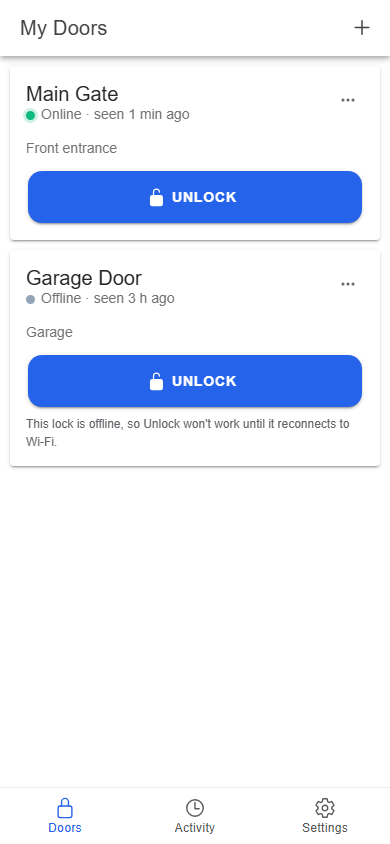
Common questions
- Will it work with my automatic gate motor?
- If your gate opener accepts an open button or push-button input, the Smart Lock Box can usually trigger it the same way. Ask us with a photo of the controller before buying.
- Can I still open the gate normally?
- Yes. Your existing keys, buttons and remotes keep working. The Smart Lock Box adds phone control; it doesn't take anything away.
- Does the gate need internet?
- Remote opening needs the Smart Lock Box to be on Wi-Fi with internet access. Keep your normal key or remote as a backup for power or internet outages.
Ready to open your door from your phone?
Create a free account, or email info@paksmartlocks.com with a photo of your lock and we'll tell you what you need.